



CNC machining tolerances define how far a machined dimension may deviate from its nominal value — for example 50 ±0.1 mm. They decide whether parts fit together and function, and they have a direct impact on machining time and cost. Choosing the right tolerances is therefore one of the most important tasks for designers and engineers.
This guide explains the types of tolerances and the standards behind them, the general tolerances according to ISO 2768, how to specify size, angular and fit tolerances correctly, and how dimensioning affects tolerance stack-up.
What are CNC machining tolerances?
A tolerance is the permissible variation of a dimension from its nominal size. No machine produces a part to exactly the nominal size: tool wear, temperature, clamping and the material itself always cause small deviations. Tolerances define how large these deviations may be, so that every part still fits, functions and is interchangeable.
In CNC machining, tolerances are usually given in millimetres (mm) or micrometres (µm) and are specified on the technical drawing or in the 3D model. They balance two goals: tight enough for the function of the part, but as loose as possible to keep machining efficient and cost-effective.
Types of tolerances in CNC machining
Five types of tolerances are used in part design. Each controls a different property and is defined by its own ISO standard:
| Tolerance type | What it controls | Standard | Example |
|---|---|---|---|
| Size tolerances (dimensional) | Lengths, diameters, thicknesses, angles | ISO 14405-1, general tolerances ISO 2768-1 | 50 ±0.1 mm, 90° ±0.5° |
| Geometrical tolerances (GD&T) | Form, orientation, location and run-out of features | ISO 1101, general tolerances ISO 2768-2 | Flatness 0.05 mm |
| Surface texture | Roughness of a surface | ISO 21920-1 (formerly ISO 1302) | Ra 1.6 µm |
| Fits | How tightly a hole and a shaft fit together | ISO 286-1 and ISO 286-2 | Ø10 H7/g6 |
| Positional tolerances | Location of features relative to datums | ISO 1101, ISO 5459 (datums) | Position Ø0.1 to A, B, C |
In the UK, BS 8888 brings these ISO standards together into one framework for technical product documentation.
Geometrical tolerances at a glance
Geometrical tolerances control the shape and position of features beyond their size. Each characteristic has its own symbol, which is placed in a feature control frame on the drawing:
| Category | Characteristics | Datum needed? |
|---|---|---|
| Form | Straightness, flatness, roundness (circularity), cylindricity | No |
| Orientation | Parallelism, perpendicularity, angularity | Yes |
| Location | Position, concentricity / coaxiality, symmetry | Yes (usually) |
| Run-out | Circular run-out, total run-out | Yes |
| Profile | Profile of a line, profile of a surface | Optional |
Key terms for size tolerances
Misunderstood terms lead to design errors. These are the most important terms according to ISO 286-1:
| Term | Meaning |
|---|---|
| Feature of size | A feature defined by a linear or angular size, e.g. a hole diameter or a groove width |
| Nominal size | The ideal size shown on the drawing, e.g. Ø10 |
| Maximum and minimum permissible size | The largest and smallest size the finished feature may have |
| Upper deviation | Maximum permissible size minus nominal size (ES for holes, es for shafts) |
| Lower deviation | Minimum permissible size minus nominal size (EI for holes, ei for shafts) |
| Tolerance | Difference between the maximum and minimum permissible size; always positive |
| Fundamental deviation | The deviation closest to the nominal size, indicated by a letter (e.g. H, g) |
| Tolerance grade (IT grade) | The size of the tolerance, indicated by a number from IT01 to IT18 |
| Tolerance class | Combination of fundamental deviation and tolerance grade, e.g. H7 or g6 |
General tolerances according to ISO 2768
When a dimension on a drawing has no individual tolerance, the general tolerance stated in the title block applies — for example “ISO 2768-mK”. General tolerances keep drawings clean: only the dimensions that really matter need an individual tolerance. They are symmetrical around the nominal size, and a part is acceptable as long as every dimension stays within the permitted range.
ISO 2768-1 defines four tolerance classes for machined parts: f (fine), m (medium), c (coarse) and v (very coarse). The values are identical to the Japanese standard JIS B 0405.
Linear dimensions (excluding chamfers and radii)
| Nominal size (mm) | f (fine) | m (medium) | c (coarse) | v (very coarse) |
|---|---|---|---|---|
| 0.5 to 3 | ±0.05 | ±0.1 | ±0.2 | – |
| Over 3 to 6 | ±0.05 | ±0.1 | ±0.3 | ±0.5 |
| Over 6 to 30 | ±0.1 | ±0.2 | ±0.5 | ±1 |
| Over 30 to 120 | ±0.15 | ±0.3 | ±0.8 | ±1.5 |
| Over 120 to 400 | ±0.2 | ±0.5 | ±1.2 | ±2.5 |
| Over 400 to 1,000 | ±0.3 | ±0.8 | ±2 | ±4 |
| Over 1,000 to 2,000 | ±0.5 | ±1.2 | ±3 | ±6 |
| Over 2,000 to 4,000 | – | ±2 | ±4 | ±8 |
Chamfers and radii (external radii and chamfer heights)
| Nominal size (mm) | f and m | c and v |
|---|---|---|
| 0.5 to 3 | ±0.2 | ±0.4 |
| Over 3 to 6 | ±0.5 | ±1 |
| Over 6 | ±1 | ±2 |
Angular dimensions
| Length of the shorter leg (mm) | f and m | c | v |
|---|---|---|---|
| Up to 10 | ±1° | ±1°30′ | ±3° |
| Over 10 to 50 | ±30′ | ±1° | ±2° |
| Over 50 to 120 | ±20′ | ±30′ | ±1° |
| Over 120 to 400 | ±10′ | ±15′ | ±30′ |
| Over 400 | ±5′ | ±10′ | ±20′ |
Class m (medium) is the most common choice for CNC-machined parts. Class f is used for precision parts, while c and v suit rough machining and large welded or cast components.
How to specify size tolerances
If the general tolerance is not sufficient, specify an individual tolerance next to the nominal dimension. If the upper and lower deviations are equal, write them with ±. If they differ, write them stacked: the upper deviation above, the lower deviation below.
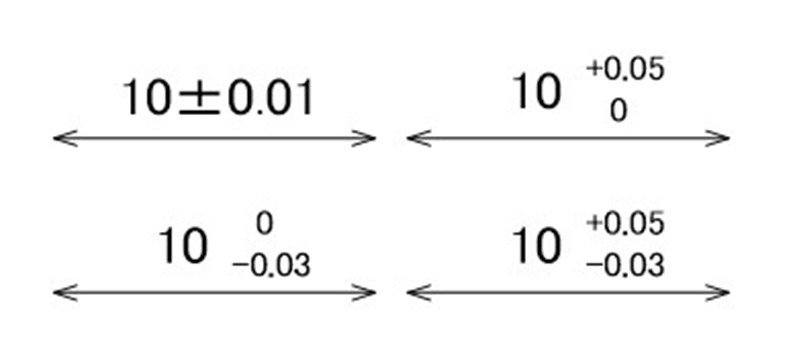
A size tolerance does not have to be symmetrical. A unilateral tolerance such as 10 +0.05/0 shifts the permitted range to one side of the nominal size and shows the design intent — for example that a hole must never be smaller than 10 mm. Keep in mind that machinists usually aim for the middle of the tolerance range.
Tolerance values are written in the same font size as the dimension itself. The default settings of your CAD software are usually fine, as long as the text is easy to read.
How to specify angular tolerances
Angular tolerances follow the same notation as size tolerances, but the unit must always be written. Angles are usually given in degrees (°), minutes (′) and seconds (″), where 60 seconds make one minute and 60 minutes make one degree — just like on a clock.
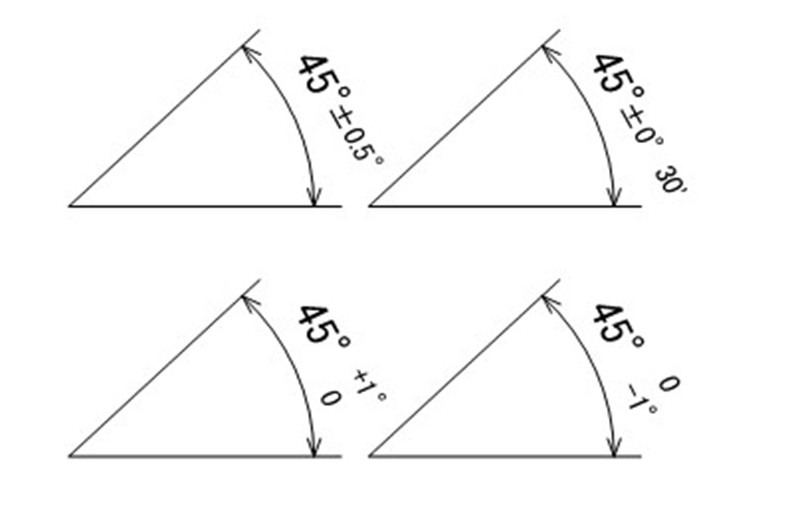
To convert minutes to decimal degrees, divide by 60. Whether you use decimal degrees or degrees and minutes is up to you — both are correct.
| Minutes | 1′ | 5′ | 10′ | 15′ | 20′ | 30′ | 45′ |
|---|---|---|---|---|---|---|---|
| Decimal degrees | 0.0167° | 0.0833° | 0.1667° | 0.25° | 0.3333° | 0.5° | 0.75° |
Tolerance stack-up: chain vs parallel dimensioning
The way you dimension a part determines how tolerances add up. The example below shows the same part with an overall width of 90 mm and a 30 mm groove, dimensioned in two ways using general tolerances (class m).
Parallel dimensioning
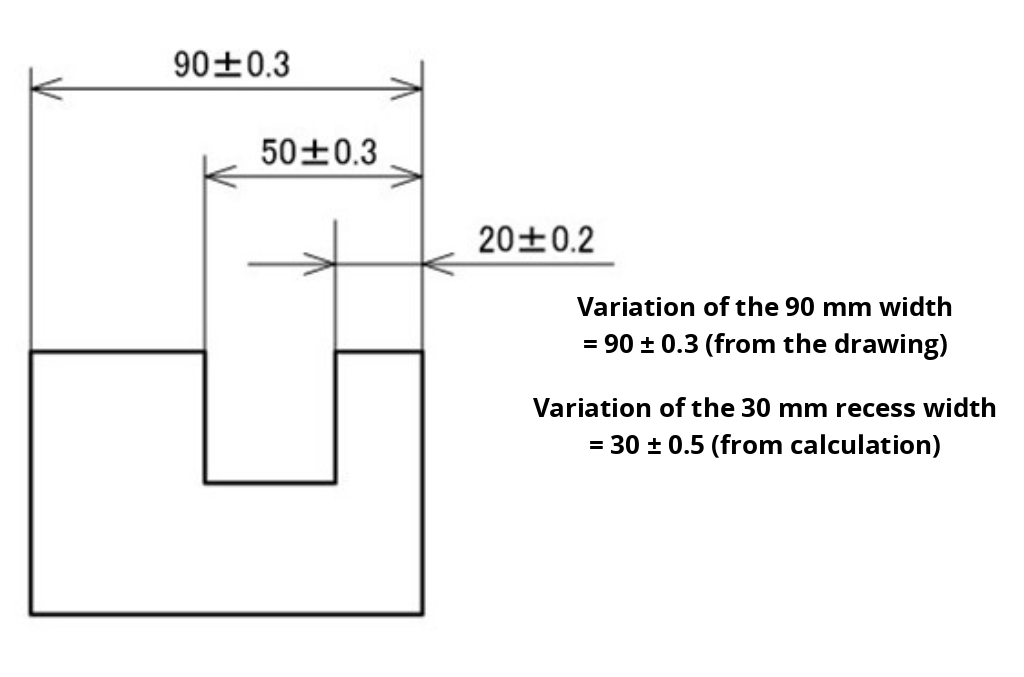
All dimensions start from the right edge. The overall width can be read directly: 90 ±0.3 mm. The groove width, however, is the difference between 50 mm and 20 mm, so both tolerances add up: ±0.3 + ±0.2 = ±0.5 mm.
Chain dimensioning
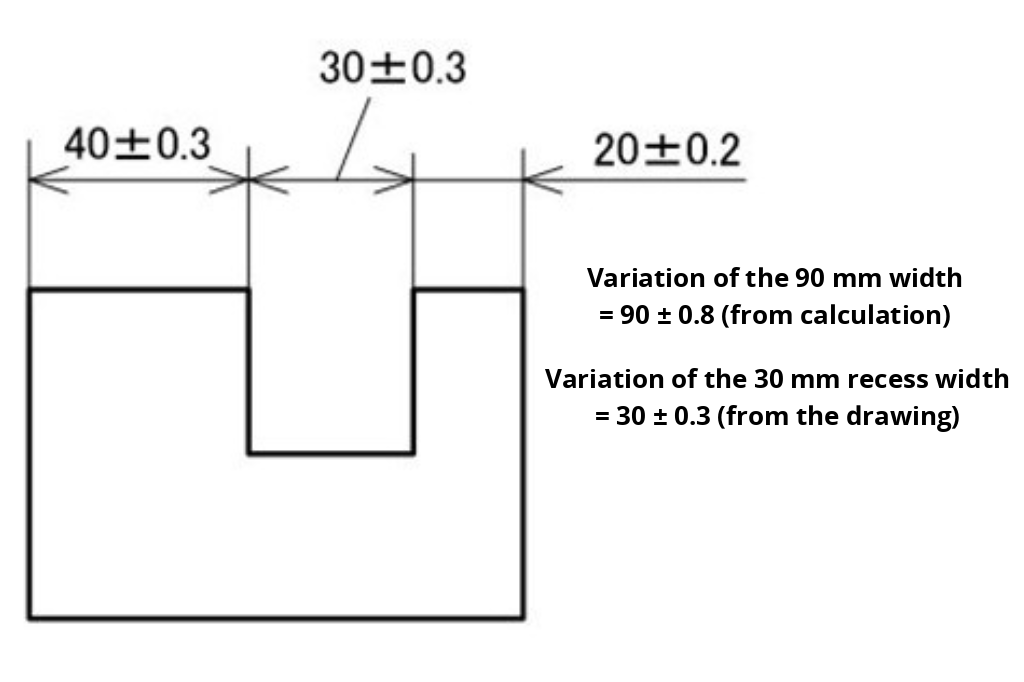
The dimensions follow one another. The groove width can be read directly: 30 ±0.3 mm. The overall width is the sum of three dimensions, so all three tolerances add up: ±0.3 + ±0.3 + ±0.2 = ±0.8 mm.
| Dimension | Parallel dimensioning | Chain dimensioning |
|---|---|---|
| Overall width 90 mm | ±0.3 mm (direct) | ±0.8 mm (calculated) |
| Groove width 30 mm | ±0.5 mm (calculated) | ±0.3 mm (direct) |
Note: nominal sizes can be added or subtracted, but tolerances always add up. The rule is simple:
- Dimension functionally critical features directly, so their tolerance is not the result of a calculation.
- If the groove width matters most, use chain dimensioning. If the overall width or the position of the groove from the edge matters most, use parallel dimensioning.
- Avoid long dimension chains on critical features: every link adds its tolerance.
The calculation above is a worst-case analysis: it assumes that all dimensions are at their extremes at the same time. For larger batch sizes, a statistical analysis (root sum square, RSS) is often used instead. In the chain example, it gives √(0.3² + 0.3² + 0.2²) ≈ ±0.47 mm instead of ±0.8 mm.
Fits: clearance, transition and interference
A fit describes the relationship between a hole and a shaft before assembly. ISO 286 defines three types of fit tolerance:
- Clearance fit: the shaft is always smaller than the hole. Used for sliding and rotating parts and for parts that must be easy to assemble.
- Transition fit: depending on the actual sizes, there is a small clearance or a small interference. Used for accurate locating of parts such as gears, couplings and dowel pins.
- Interference fit: the shaft is always larger than the hole. Used for press-fitted parts such as bushings and pins that must stay in place permanently.
How to specify fits on a drawing
Fits are specified with a tolerance class after the nominal size: an uppercase letter for holes (Ø10 H7) and a lowercase letter for shafts (Ø10 g6). The letter defines the position of the tolerance zone relative to the nominal size; the number defines its size. Grooves and slots count as holes, protrusions as shafts.
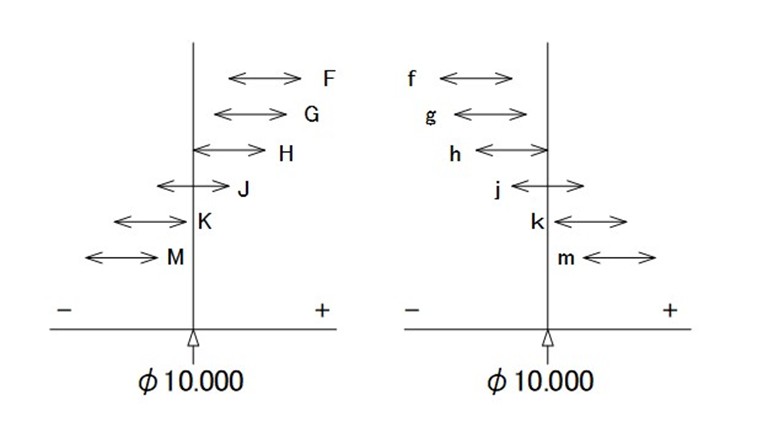
The hole-basis system with H7 holes is the most common in mechanical engineering. Typical combinations:
| Fit | Type | Shaft deviations at Ø10 (hole H7: 0/+0.015 mm) | Typical use |
|---|---|---|---|
| H7/g6 | Clearance (sliding) | −0.005 / −0.014 mm | Precise sliding and rotating parts, guides |
| H7/h6 | Clearance (locational) | 0 / −0.009 mm | Parts that are positioned and can be assembled by hand |
| H7/k6 | Transition | +0.010 / +0.001 mm | Gears, pulleys and couplings on shafts |
| H7/p6 | Interference (light press) | +0.024 / +0.015 mm | Press-fitted bushings and dowel pins |
How tight should CNC machining tolerances be?
Tighter tolerances mean slower machining, more inspection and more scrap — so cost rises sharply as tolerances get tighter. As a guide for CNC machining:
- Standard machining: general tolerance ISO 2768-m, i.e. ±0.1 to ±0.3 mm for typical part sizes.
- Precision machining: ±0.01 to ±0.05 mm for fits, bearing seats and locating features.
- Plastics: plan for wider tolerances, because plastics expand more with temperature and some absorb moisture.
Follow these principles to keep parts accurate and affordable:
- Check the general tolerance first, and only add individual tolerances where the function needs them.
- Use standard fit classes such as H7 instead of arbitrary values for mating parts.
- Dimension critical features directly to avoid tolerance stack-up.
- Consider the material: stainless steel, hardened steel and plastics are harder to hold to tight tolerances than aluminium or free-cutting steel.
CNC machining tolerances with meviy
meviy, the on-demand manufacturing platform by MISUMI, produces individually designed parts directly from your 3D CAD data — not catalogue or standard parts. Tolerances are handled directly in the 3D model, without a 2D drawing:
- Dimensions without an individual tolerance are machined to medium general tolerances (JIS B 0405 m, equivalent to ISO 2768-m).
- Tighter tolerances are set directly in the 3D viewer, with tolerance ranges as small as 0.02 mm (±0.01 mm).
- Precision holes with fit tolerance H7 are produced by reaming.
- Price and lead time are recalculated instantly when you change a tolerance, so you can see the cost of precision right away.
This applies to CNC milling and CNC turning. Learn more about CNC machining with meviy.
Frequently asked questions about CNC machining tolerances
What is a standard tolerance for CNC machining?
The most common standard is the general tolerance ISO 2768-m (medium). For a dimension between 30 and 120 mm, it allows ±0.3 mm. Tighter tolerances must be specified individually on the drawing or in the 3D model.
What is the difference between ISO 2768-1 and ISO 2768-2?
ISO 2768-1 covers general tolerances for linear and angular dimensions in the classes f, m, c and v. ISO 2768-2 covers general geometrical tolerances such as straightness, flatness and perpendicularity in the classes H, K and L. They are often combined on drawings, e.g. ISO 2768-mK.
What does H7 mean?
H7 is a tolerance class for holes according to ISO 286. The letter H means the lower deviation is zero, so the hole is never smaller than the nominal size. The number 7 is the tolerance grade; for a Ø10 hole, H7 allows 0 to +0.015 mm.
What is tolerance stack-up?
Tolerance stack-up is the accumulation of tolerances when a dimension results from several other dimensions. In a chain of three dimensions with ±0.3, ±0.3 and ±0.2 mm, the resulting dimension can vary by up to ±0.8 mm. Dimensioning critical features directly prevents this.
How tight can CNC machining tolerances be?
Modern CNC machines can hold tolerances of ±0.01 mm and tighter on critical features. Such tolerances increase cost significantly, so they should only be used where the function of the part requires them.
Conclusion
CNC machining tolerances are the link between design intent and a functional, affordable part. Use general tolerances according to ISO 2768 for everything that is not critical, add individual size, angular and fit tolerances only where the function needs them, and dimension critical features directly to avoid tolerance stack-up. The result: parts that fit the first time, at the lowest possible cost.