


A technical drawing is the language engineers and manufacturers use to describe a part completely: its shape, dimensions, tolerances, material and surface requirements. Anyone who designs, buys, machines or inspects parts needs to read one — yet many find technical drawings hard to interpret, which leads to misunderstandings, rework and delays.
This guide explains the basics of technical drawings for CNC parts: line types, views and projections, dimensions and tolerances, the most important symbols, the title block and paper formats — and how to read even complex drawings step by step.
What is a technical drawing?
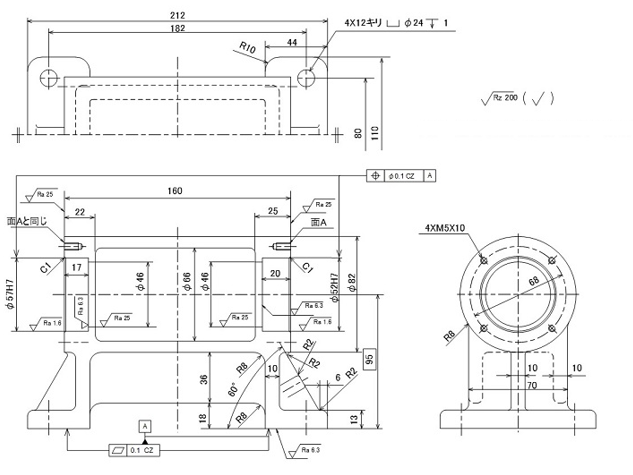
A technical drawing — also called an engineering drawing — is a standardised 2D representation of a part or assembly that contains all the information needed to manufacture and inspect it. It is often described simply as “a projection of the part with dimensions”, but that falls short.
Under ISO 9001, technical drawings are controlled documents: they follow approval procedures and revision rules, and every change is traceable. If dimensions alone were enough, the 3D CAD model would replace the drawing entirely. A drawing, however, also defines tolerances, fits, surface roughness, material, heat treatment, machining notes and inspection requirements. In short, it is the complete specification that carries the design intent from the designer to everyone who works with the part.
Who uses technical drawings?
Technical drawings are not only used in the design department. Many other teams rely on them, each for a different purpose:
| Department | What the drawing is used for |
|---|---|
| Procurement and production planning | Assessing machining requirements, cost and lead time to choose the right supplier |
| Manufacturing engineering and machining | Choosing machining methods and machines, planning processes and fixtures, estimating cost |
| Quality assurance | Checking specifications, reliability, safety, assembly and maintenance requirements |
| Inspection | Choosing measuring equipment and defining inspection procedures |
| Sales | Clarifying customer requirements and justifying quotations |
| External suppliers | Preparing quotes, checking manufacturability, inspection criteria and packaging |
Line types in technical drawings
Every line in a technical drawing has a defined meaning. The line types and their uses are standardised in ISO 128:
| Line type | Appearance | Used for |
|---|---|---|
| Continuous wide line | Thick solid line | Visible edges and outlines |
| Continuous narrow line | Thin solid line | Dimension lines, extension lines, leader lines, hatching |
| Dashed narrow line | Thin short dashes | Hidden edges and internal features |
| Long-dashed dotted narrow line | Thin chain line | Centre lines, axes, lines of symmetry, hole positions |
| Long-dashed double-dotted narrow line | Thin chain line with two dots | Adjacent parts, extreme positions of moving parts |
| Freehand or zigzag narrow line | Thin wavy or zigzag line | Break lines that shorten long parts or mark the edge of partial views |
Views and projections
A technical drawing shows a 3D part in 2D. The most common method is orthographic projection: the part is shown in several flat views — usually front, top and side — without distortion, so every dimension can be read at its true size.
Watch out for the projection method, because it changes where the views are placed:
| Projection method | Where it is used | View placement |
|---|---|---|
| First-angle projection | Europe and most ISO countries | Top view below the front view, left side view to the right of it |
| Third-angle projection | USA (ASME), Canada | Top view above the front view, right side view to the right of it |
The projection symbol in the title block — a truncated cone — shows which method the drawing uses. Mixing them up is one of the most common reasons for mirrored parts.
Other important views are:
- Isometric view: a 3D view without perspective distortion that shows how the finished part looks.
- Section view: the part is cut along a plane to show internal features such as bores, pockets and wall thicknesses.
- Detail view: a small area is shown enlarged so that fine features can be dimensioned clearly.
Dimensions and tolerances
Dimensions turn a shape into a manufacturable part. Dimension lines show the size of a feature, extension lines connect the dimension to the feature, and the numerical value states the nominal size in millimetres. Good dimensioning starts from clear reference surfaces and avoids redundant dimensions.
Because no part can be made to exactly the nominal size, every dimension needs a tolerance — the permitted variation. Tolerances are specified in several ways:
- Bilateral tolerance: variation in both directions, e.g. 50 ±0.1.
- Unilateral tolerance: variation in one direction only, e.g. 50 +0.1/0.
- Fit tolerance: ISO fit codes such as Ø20 H7 for holes and shafts that must fit together.
- Geometric tolerances (GD&T): permitted deviations of form, orientation and position, such as flatness, perpendicularity or position, according to ISO 1101 or ASME Y14.5.
- General tolerances: apply to all dimensions without an individual tolerance and are stated once in the title block, e.g. “ISO 2768-m”.
The most widely used general tolerance standard for machined parts is ISO 2768-1. These are the permitted deviations for linear dimensions:
| Nominal size | f (fine) | m (medium) | c (coarse) |
|---|---|---|---|
| 0.5 to 3 mm | ±0.05 mm | ±0.1 mm | ±0.2 mm |
| Over 3 to 6 mm | ±0.05 mm | ±0.1 mm | ±0.3 mm |
| Over 6 to 30 mm | ±0.1 mm | ±0.2 mm | ±0.5 mm |
| Over 30 to 120 mm | ±0.15 mm | ±0.3 mm | ±0.8 mm |
| Over 120 to 400 mm | ±0.2 mm | ±0.5 mm | ±1.2 mm |
| Over 400 to 1,000 mm | ±0.3 mm | ±0.8 mm | ±2.0 mm |
Only specify tight tolerances where the function requires them. Every tighter tolerance means more machining time and inspection effort — and a higher price.
Common symbols and notations
Standard symbols keep drawings short and unambiguous. These are the ones you will see most often on drawings of CNC parts:
| Symbol | Meaning | Example |
|---|---|---|
| Ø | Diameter | Ø46 = 46 mm diameter |
| R | Radius | R8 = 8 mm radius |
| C | 45° chamfer | C1 = 1 mm × 45° chamfer |
| M | Metric thread | 4×M5×10 = four M5 threads, 10 mm deep |
| ⌴ | Counterbore | ⌴ Ø24 = counterbore with 24 mm diameter |
| H7, h6 … | ISO fit tolerance | Ø57 H7 = hole with fit tolerance H7 |
| Ra, Rz | Surface roughness (ISO 21920-1) | Ra 1.6 = average roughness 1.6 µm |
| Tolerance frame | Geometric tolerance | ⌖ Ø0.1 A = position tolerance 0.1 mm to datum A |
| Datum triangle | Reference feature | Filled triangle with letter A |
Learn more about counterbore holes, or see our sheet metal design guide for the symbols used on sheet metal drawings.
Scale
Parts are drawn to scale so that proportions stay correct. The scale is stated in the title block. Standard scales according to ISO 5455 are:
- Full size: 1:1
- Reduction: 1:2, 1:5, 1:10, 1:20, 1:50 … for large parts
- Enlargement: 2:1, 5:1, 10:1 … for small parts and details
Never measure dimensions from a printed drawing: the dimension values are always binding, not the drawn size.
The title block
The title block is the index of a drawing. It sits in the bottom right corner of the drawing area and contains the information needed to identify and manage the drawing (ISO 7200):
- Part name and drawing number: unique identification of the part and the drawing sheet.
- Material: material designation, and heat treatment or surface treatment if required.
- Scale and projection symbol: how the part is drawn and how the views are arranged.
- General tolerances: e.g. ISO 2768-m for all dimensions without an individual tolerance.
- Created by, checked by, approved by: names and dates for accountability.
- Revision index and sheet number: which version is valid and how many sheets belong to the drawing.
Paper sizes and borders
Even in the age of CAD, printed drawings are still widely used in production and inspection, where dimensions are checked and marked directly on paper. Technical drawings use the ISO A series:
| Format | Size (mm) |
|---|---|
| A0 | 841 × 1,189 |
| A1 | 594 × 841 |
| A2 | 420 × 594 |
| A3 | 297 × 420 |
| A4 | 210 × 297 |
Each size is half of the next larger one: two A4 sheets make an A3, and so on up to A0. According to ISO 5457, the drawing area is enclosed by a frame with a 20 mm filing margin on the left edge and 10 mm on all other edges. Centring marks in the middle of each edge help to align the drawing when it is copied or scanned.
Types of technical drawings
Depending on their purpose, technical drawings fall into different types. These are the most important ones for designers:
| Drawing type | Content |
|---|---|
| Part (detail) drawing | All information needed to manufacture a single part |
| Assembly drawing | Position and relationship of the parts in an assembly, usually with a parts list |
| General arrangement drawing | External shape, overall dimensions and mass for packaging, transport and installation |
| Installation drawing | How a product is installed and connected to the surrounding structure |
| Development drawing | The unfolded flat pattern of a part, e.g. for sheet metal |
| Blank drawing | The unmachined state of a part, e.g. a casting or forging |
How to read complex technical drawings
A complex drawing can be overwhelming at first. The good news: even the most intricate part is made of simple geometric shapes. CAD models are created by people, step by step, so every part can be broken down into basic elements such as cylinders, plates, blocks and ribs.
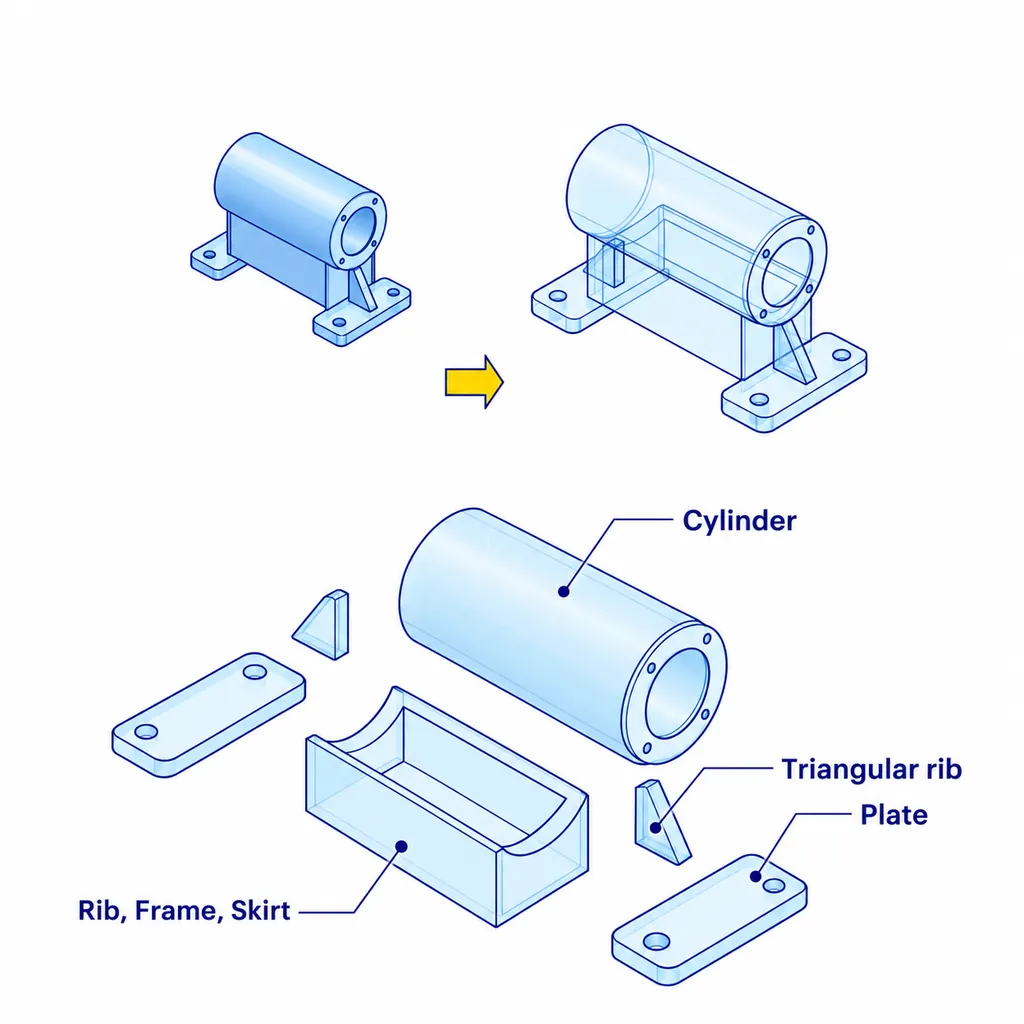
To read a drawing, work through it in this order:
- Read the title block: part name, material, scale, projection method and general tolerances.
- Get an overview: identify the views and imagine the overall shape, using an isometric view if there is one.
- Break the part down: split it into basic shapes and match each one across the views.
- Follow the dimensions: start from the datums and reference surfaces.
- Check the requirements: tolerances, fits, threads, surface roughness and notes.
What makes a good technical drawing
A good technical drawing speeds up quoting, machining and inspection. It follows four principles:
- Standardised: it follows ISO 128 or ASME Y14.5, so it is understood the same way everywhere.
- Accurate: shape, size and specifications match the part exactly.
- Clear: correct line types, readable labels and standard symbols leave no room for interpretation.
- Complete: material, tolerances, surface requirements and notes are all included.
The result is better communication between design and production, fewer errors and less scrap, easier CAM programming and a clear basis for quality control.
Technical drawings and 3D CAD: ordering CNC parts with meviy
With meviy, you can order custom machined parts directly from your 3D CAD model — no technical drawing required. Upload the model, and meviy recognises the geometry and hole types, checks manufacturability and shows the price and lead time within seconds.
- Individually designed parts from your own CAD data — not catalogue or standard parts.
- Dimensions without an individual tolerance are made to medium general tolerances (equivalent to ISO 2768-m).
- Tighter tolerances, threads, fits and other hole specifications are set directly in the 3D viewer — with tolerance ranges as small as 0.02 mm (±0.01 mm).
- Available for CNC milling and CNC turning; sheet metal parts are also ordered directly from 3D CAD.
This saves the hours or days it takes to create a 2D drawing for each part. If you only have a 2D drawing, meviy can still provide a quote for CNC machining on request.
Frequently asked questions about technical drawings
What is a technical drawing?
A technical drawing is a standardised 2D representation of a part or assembly. It defines the shape, dimensions, tolerances, material, surface requirements and other information needed to manufacture and inspect the part.
What is the difference between first-angle and third-angle projection?
Both show the same views but place them differently. In first-angle projection, used in Europe, the top view is below the front view. In third-angle projection, used in the USA, the top view is above the front view. The projection symbol in the title block shows which method applies.
What does ISO 2768-m mean on a drawing?
It means that all dimensions without an individual tolerance are made to the general tolerance class “medium” of ISO 2768-1 — for example ±0.2 mm for dimensions over 6 to 30 mm.
What information belongs in the title block?
The title block contains the part name, drawing number, material, scale, projection symbol, general tolerances, the names of the creator and approver, and the revision index.
Do I need a technical drawing to order CNC parts?
Not with meviy. You can upload your 3D CAD model and define tolerances, threads and fits directly in the 3D viewer. Many other suppliers still require a 2D drawing in addition to the 3D model.
Conclusion
Technical drawings are the link between design intent and the finished part. Once you understand line types, views and projections, dimensions and tolerances, symbols and the title block, even complex drawings become easy to read. And for many parts, a complete 3D model is all you need to get started.