



A corner radius is the rounded transition where two surfaces of a part meet. In CNC milling, inside corners can never be perfectly sharp — the rotating end mill always leaves a radius behind. Knowing why, and how large that radius should be, helps you design parts that are easier, faster and cheaper to machine.
This guide explains where corner radii come from, how they affect pockets, steps and notches, and how to choose the right radius for your pocket depth — including the limits that apply when you order milled parts from meviy.
What is a corner radius?
A corner radius (plural: corner radii) is the curvature at the intersection of two surfaces of a mechanical component. It is a critical design feature, especially for machined parts. Sharp inside corners are difficult to produce precisely because of tool deflection, material properties and cutting forces. A corner radius avoids these problems: it creates smoother transitions, reduces stress concentrations and improves the durability and performance of the part.
Corner radii are defined in the drawing or directly in the 3D model so that the part is manufactured consistently and accurately. They influence the function, service life and appearance of components in every industry, from automotive and aerospace to electronics and machine building.
Why milled parts have rounded inside corners
In milling, material is removed by a rotating cutting tool pressed against the workpiece. Seen from above, the cutting edge always describes a circle. When a standard square end mill moves through the material, it therefore cuts a cylindrical path — and wherever it changes direction, it leaves a curved shape behind.
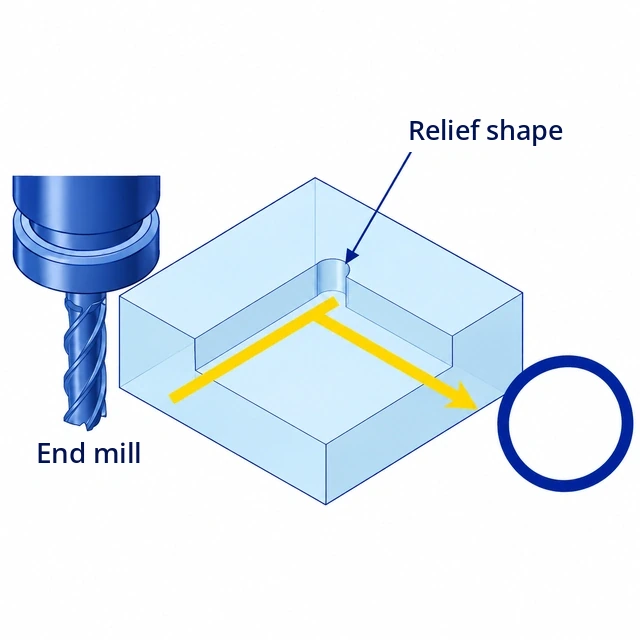
Imagine moving an end mill along an L-shaped path through a block, as shown below.
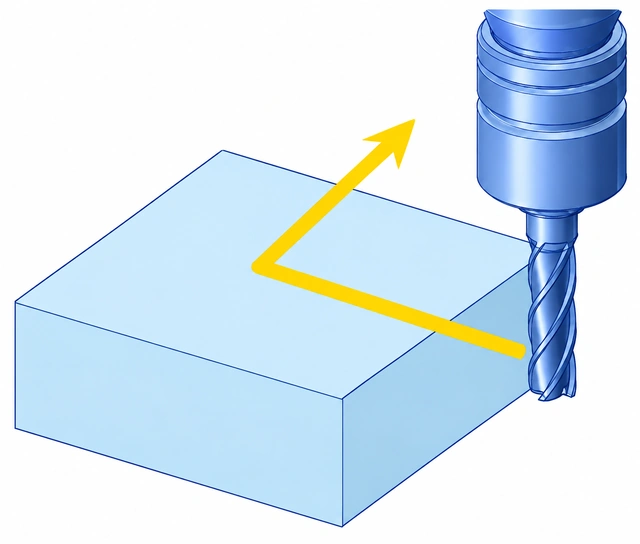
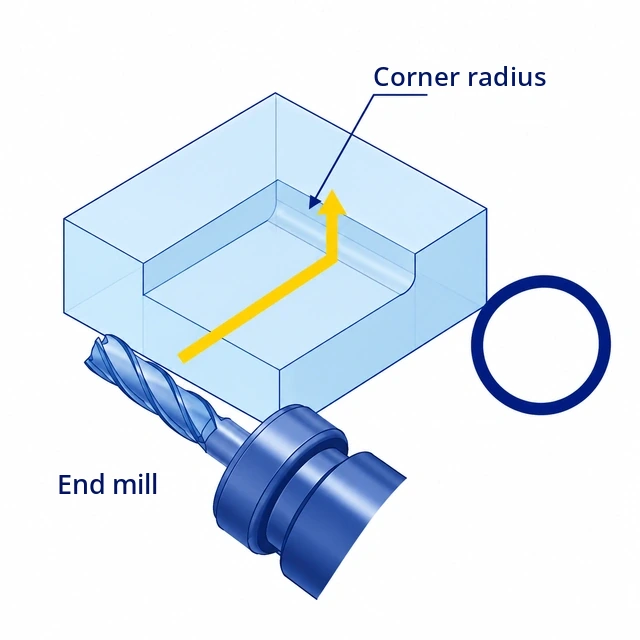
The result is shown in the next illustration. The inside corner where the two walls of the slot meet cannot be machined as a sharp edge (A). Instead, it takes on the radius of the cutting tool (B) — half of the end mill diameter. This rounded transition is the corner radius.
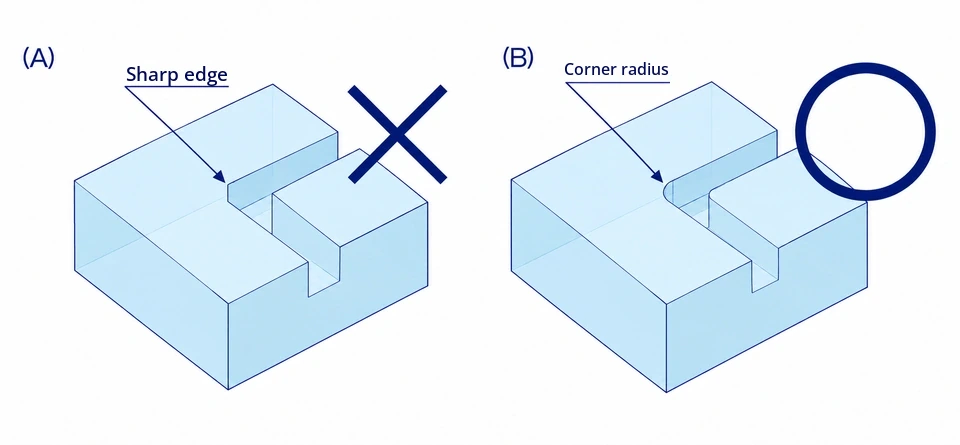
Because the cutting tool rotates, corner radii are unavoidable in milling wherever walls meet at an inside corner and the tool cannot pass through. Sharp inside corners can only be produced with electrical discharge machining (EDM), which melts away material with electrical discharges, using an electrode in the inverse shape of the desired form. Because of the cost of the electrode and the EDM process itself, this method is only used when absolutely necessary.
Corner radii in pockets and steps
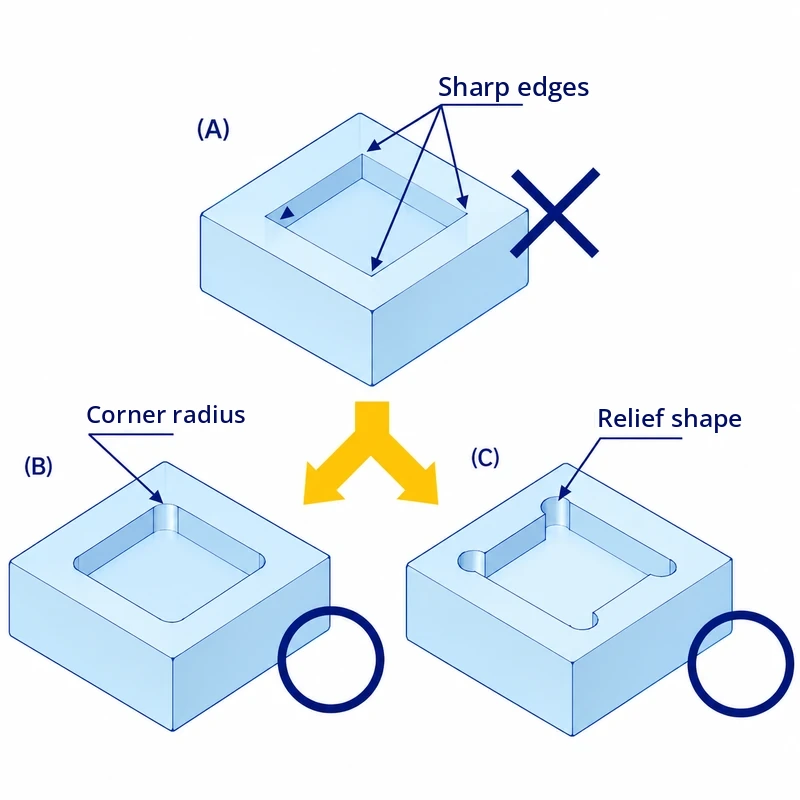
A square pocket is a typical example: all four inside corners are enclosed by walls, so they always get a corner radius (B). This is the standard solution.
Alternatively, the radius can be placed slightly outside the wall, as shown in (C). This relief shape is used when an object with sharp corners has to fit snugly into the pocket — the relief gives the corners of the inserted part room, so it sits flush against the walls.
The same applies to a step: its inside corner cannot be sharp either. In practice, the step is usually machined with the end mill coming in from above, which leaves a corner radius on the vertical inside edge.
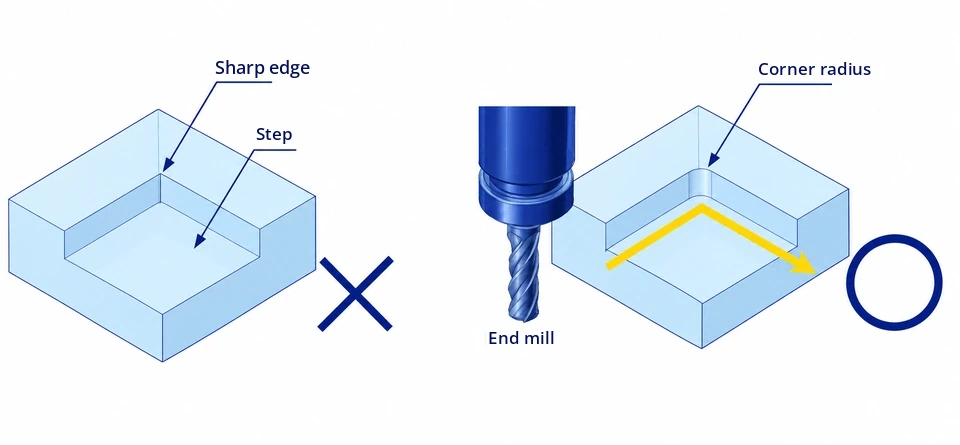
When machining from above, a relief shape is also possible at the inside corner. Alternatively, the end mill can be brought in from the side of the block, which places the corner radius along the horizontal inside edge. This is less common because of factors such as the required tool length, but it is a valid option.
Sharp corners and additional setups
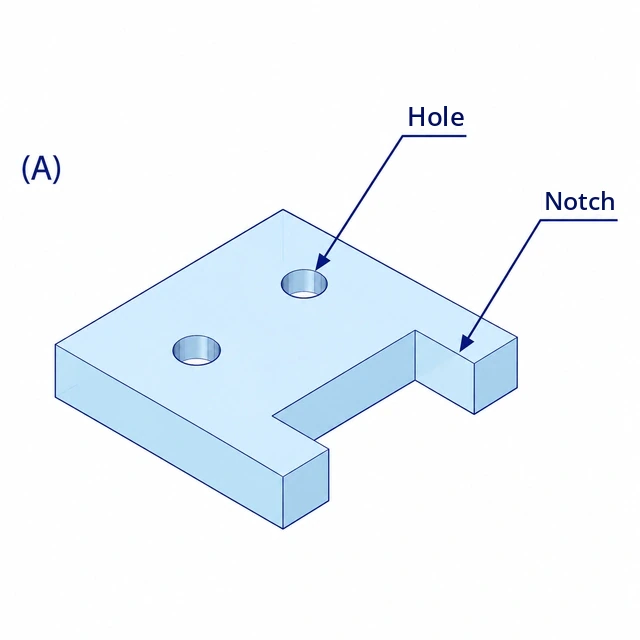
Can the plate above — with two holes and a notch without corner radii — be machined? Yes. If the shape is not enclosed by walls and the cutting tool can pass through, it can be milled, for example from the side. However, this requires an additional setup.
Machining from a different direction means loosening the fixture, reorienting the workpiece, clamping it again and resetting the workpiece zero. This takes considerable effort and increases the cost of the part. In meviy, the corner radius in your 3D model tells the system which machining direction and tool diameter to use — if you remove the radius, the part has to be machined from another direction.
How large should a corner radius be?
For contour milling with an end mill, a guideline of L / D ≤ 5 is recommended. L is the protrusion length of the cutting tool in mm — the length the end mill extends from the tool holder. D is the diameter of the end mill in mm.
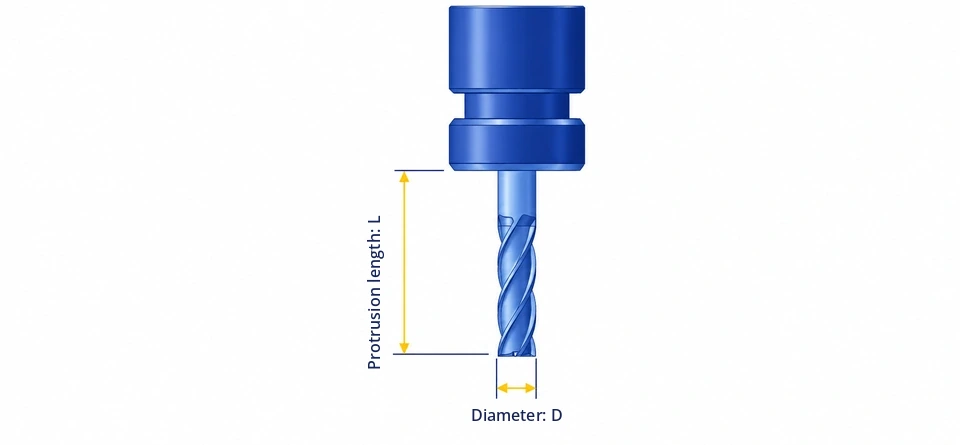
If the protrusion length is much larger than the diameter, the tool starts to vibrate. These vibrations can cause rough surfaces, inaccurate dimensions or even tool breakage. Staying within L / D ≤ 5 helps you avoid these risks. The exact limit depends on machining conditions such as cutting speed, depth of cut and material, so use the guideline as a rough estimate.
If you treat the depth of a pocket or notch in your design as the protrusion length, you can estimate the minimum corner radius. Because the radius equals half the tool diameter, the rule of thumb is: corner radius ≥ depth ÷ 10.
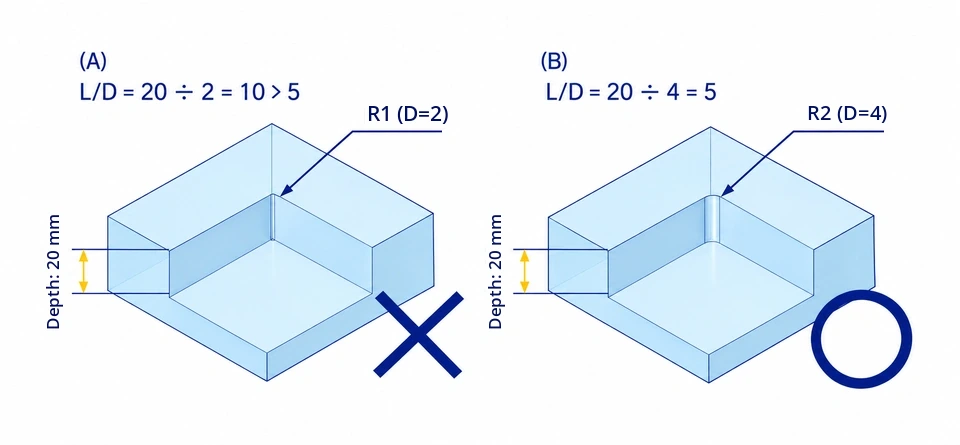
In example (A), the corner radius is R1, so the end mill diameter is 2 mm. With a depth of 20 mm, L / D = 10, which exceeds the guideline of 5 — the radius is too small for this depth and should be avoided. In example (B), the corner radius is R2 with a 4 mm end mill, giving L / D = 5. This radius is feasible.
This approach lets you check your corner radii systematically. Keep in mind that very small radii quickly become impractical: an R0.1 corner, even at only 1 mm depth, would require an end mill with a diameter of 0.2 mm — feasible only in special fields such as mould making or micro-machining. If you are unsure, ask the machining shop. On 2D drawings, a note such as "R3 or less" lets the shop choose the most suitable radius within that range. With meviy, the 3D model is manufactured exactly as designed, so model the radius you want directly.
Design tips for corner radii
- Use the largest radius your design allows. A larger radius means a larger end mill, which shortens machining time and lowers the cost.
- Check the radius against the depth. As a rule of thumb, the corner radius should be at least one tenth of the pocket or notch depth.
- Keep radii consistent. Using the same radius for all inside corners lets one tool machine them all.
- Model inside corner radii of at least R0.75 in your 3D CAD data.
- Do not model the nose radius — the tiny radius at the tip of the end mill. It prevents the machining direction from being recognised correctly.
- Use relief shapes where a part with sharp corners has to fit into a pocket.
- Define corner radii clearly in the model or drawing to avoid misunderstandings and delays.
Corner radii in milled parts from meviy
meviy manufactures individually designed custom parts from your own 3D CAD data — not standard or catalogue parts. For parts made by CNC milling, meviy reads the corner radii in your model to determine the tool diameter and machining direction, and checks automatically whether the pocket depth fits the radius. The table shows the approximate maximum pocket depth for automatic quotation:
| Corner radius R | Steel* | Aluminium | Stainless steel |
|---|---|---|---|
| > 0.74 – 1.5 mm | ≤ 15 mm | ≤ 15 mm | ≤ 15 mm |
| > 1.5 – 3 mm | ≤ 20 mm | ≤ 20 mm | ≤ 20 mm |
| > 3 – 4 mm | ≤ 30 mm | ≤ 30 mm | ≤ 24 mm |
| > 4 – 5 mm | ≤ 40 mm | ≤ 40 mm | ≤ 32 mm |
| > 5 – 6 mm | ≤ 50 mm | ≤ 50 mm | ≤ 40 mm |
| > 6 – 8 mm | ≤ 60 mm | ≤ 60 mm | ≤ 48 mm |
| > 8 – 10 mm | ≤ 80 mm | ≤ 80 mm | ≤ 64 mm |
| > 10 mm | ≤ 100 mm | ≤ 150 mm | ≤ 80 mm |
*Steel, pre-hardened steel and tool steel. For plastics, the minimum corner radius is just above 1.25 mm, with lower maximum depths.
- Corner radius and pocket depth checked automatically when you upload your 3D model
- Clear feedback if a radius is too small for the depth, so you can enlarge it before you order
- Relief shapes created automatically in the pocket corners when you specify grinding of the inner surfaces
- Instant price and lead time — no 2D drawing required
Because the radius directly affects tool size and machining time, you can see the cost impact of a larger or smaller radius on your CNC machining parts before you order.
Frequently asked questions about corner radius
Why can't inside corners be sharp in CNC milling?
The end mill is round and rotates, so it always leaves a radius at an inside corner — equal to half of its diameter. Truly sharp inside corners can only be produced with special processes such as electrical discharge machining (EDM), which is considerably more expensive.
How do I calculate the minimum corner radius?
Use the guideline L / D ≤ 5, where L is the depth to be machined and D the end mill diameter. Since the radius is half the diameter, the corner radius should be at least one tenth of the depth — for a 20 mm deep pocket, at least R2. For parts ordered from meviy, also check the maximum depths per radius and material.
What is a relief shape in a pocket corner?
A relief shape places the corner radius slightly outside the pocket wall. It gives the sharp corners of an inserted part room, so the part sits flush against the walls. It is also used when the inner surfaces of a pocket are ground.
What is the difference between a corner radius and a chamfer?
A corner radius is a rounded transition, typically at an inside corner where the tool leaves its shape. A chamfer is an angled cut, usually on an outside edge. With meviy, outside edges modelled sharp are finished with a small chamfer of C0.1 to 0.5; larger chamfers must be modelled.
Designing parts with the right corner radius
Corner radii are unavoidable in many milled shapes, so define them consciously and clearly. Choose radii that suit the depth of your pockets and notches, keep them as large and consistent as possible, and use relief shapes where sharp-cornered parts need to fit. This leads to smoother production, lower costs and more precise parts.